In my previous post, I established the principles that I’m following when building and managing my Personal Knowledge Management System (PKMS): Building a Personal Knowledge Management System.
The main concepts are:
- Capture & let grow (or die): capture ideas while they’re fresh. Keep them small and let time decide whether they’re worth developing.
- Separate knowledge from information: books/videos/articles are inputs; knowledge is output.
- Think in connections, not folders: links (“how does this relate?”) matter more than folders (“where does this live?”).
- Navigate with a compass and maps: use intentional relationships and Maps of Content to navigate your knowledge.
In this follow-up post, I’ll share how I leverage Obsidian to implement those concepts. It should serve as an overview of my system, from which I will expand into dedicated deep dives in the future.
I am not trying to create a “second brain” for the sake of it, I am trying to build a system that helps me learn, remember and connect ideas over time.
I’m only at the beginning of this PKMS journey, but what’s interesting is that it got me excited about learning again. I find myself actively looking for things worth turning into personal knowledge.
Knowledge workflow
Most ideas and pieces of information flow through my system in roughly this way:
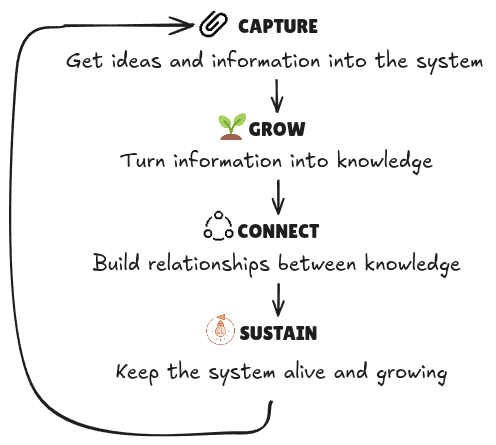
Capture
Principle: Capture first, organise later.
I capture two kinds of input:
- External information: something someone else wrote or described
- Personal ideas: thoughts, questions or observations that come from me
Capture information
I like reading posts, books or watching videos. I’ve developed the habit to capture highlights that I think have the potential to become knowledge or connect to something I already know. I try to be intentional about what I capture.
The only information worth saving is information that might influence or connect to my existing knowledge.
Capture ideas
Ideas are much more fragile than information. If I don’t write them down quickly, they’re usually gone.
Whether they come to me while walking, waking up or standing in the shower, I want to be able to capture it in seconds and decide what to do with it later.
Grow knowledge
Principle: Turn information into knowledge.
This is where the system starts creating value. I learn either from experience or from an external resource. Writing what I’ve learned in my own words forces me to process the idea more deeply.
Collecting information is easy, but learning isn’t.
Turning it into something you understand and can explain in your own words, is much harder.
From information to knowledge
From the previous step, I now have a note with highlights that I found interesting. The next step is to turn this into personal knowledge. This is where I make a new note and rephrase in my own words what I learned.
Once a piece of knowledge is created, I can then build on it. I could use it for a future project or turn it into a public post like this one.
Information
        ↓
Source note with personal highlights (From the Capture step)
        ↓
Knowledge
        ↓
Projects / Public writing
Small, individual knowledge notes have limited value on their own. The next-level value comes from the connections they have with everything else I know.
Connect & Navigate
Principle: Knowledge is a network, not a hierarchy.
Finding connections between seemingly unrelated ideas is something that I always enjoyed doing. Now I have a system that encourages that way of thinking.
A growing knowledge graph quickly becomes a bit chaotic, and that’s by design.
I love a bit of chaos, as long as there are efficient ways to navigate it.
I use a few different tools to navigate and also find new connections:
- Links & Backlinks
- Local graph (occasionally the global graph)
- Maps of Content
- Compass using Excalibrain
- Semantic search to find new connections
I’ll explore those in more detail in future posts.
Sustain
Principle: Maintain, grow and stay inspired.
If we go back to the garden analogy, they don’t stay healthy on their own. They need to be revisited and cared for. That might sound like boring admin, but by revisiting my notes, I improve them and sometimes find new connections.
I’ve realised that maintenance only happens if I’m motivated to open my vault in the first place, which is why I built a simple homepage. It’s not a fancy dashboard, it’s designed to surface forgotten notes and unfinished ideas to encourage exploration and growth.
If opening my vault feels like a chore, I won’t do it.
Closing thoughts
Building this system made me wonder if I’m overengineering learning and thinking. I probably am.
People often say that teaching is learning twice. Writing this series of posts had a similar effect: explaining how my knowledge system works forced me to deconstruct it into smaller pieces, and discover more about how I think.
Making something clearer for other people also makes it clearer for yourself.
The workflow I’ve described here will likely change over time, but the reflection exercise was worth it. I’ve found that reflecting and writing are a major part of my learning process.
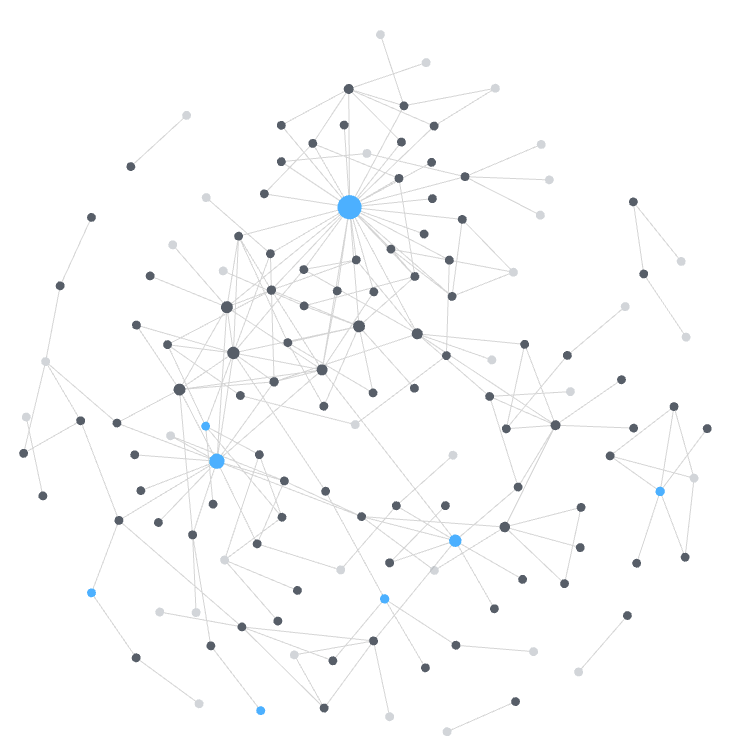
For fun, here’s a screenshot of my knowledge graph at the time of writing (~100 notes). Let’s see how both the graph and my thinking evolve over time.