I recently started using Obsidian to organise my notes. I’ve been particularly impressed by its local-first philosophy and its focus on connections between notes rather than a traditional folder hierarchy.
One thing I wanted was a simple way to publish selected notes as a website directly from Obsidian, without maintaining two copies of the same content.
This is how I made this blog: I write in Obsidian, run a single command, and the website is updated while preserving the links and graph structure between notes.
I have a dedicated Public/Quartz folder which contains what’s on the website. I can link my other private notes to my public notes and leverage my other Obsidian plugins (SmartConnection, etc.).
Obisidian -> make publish -> Website
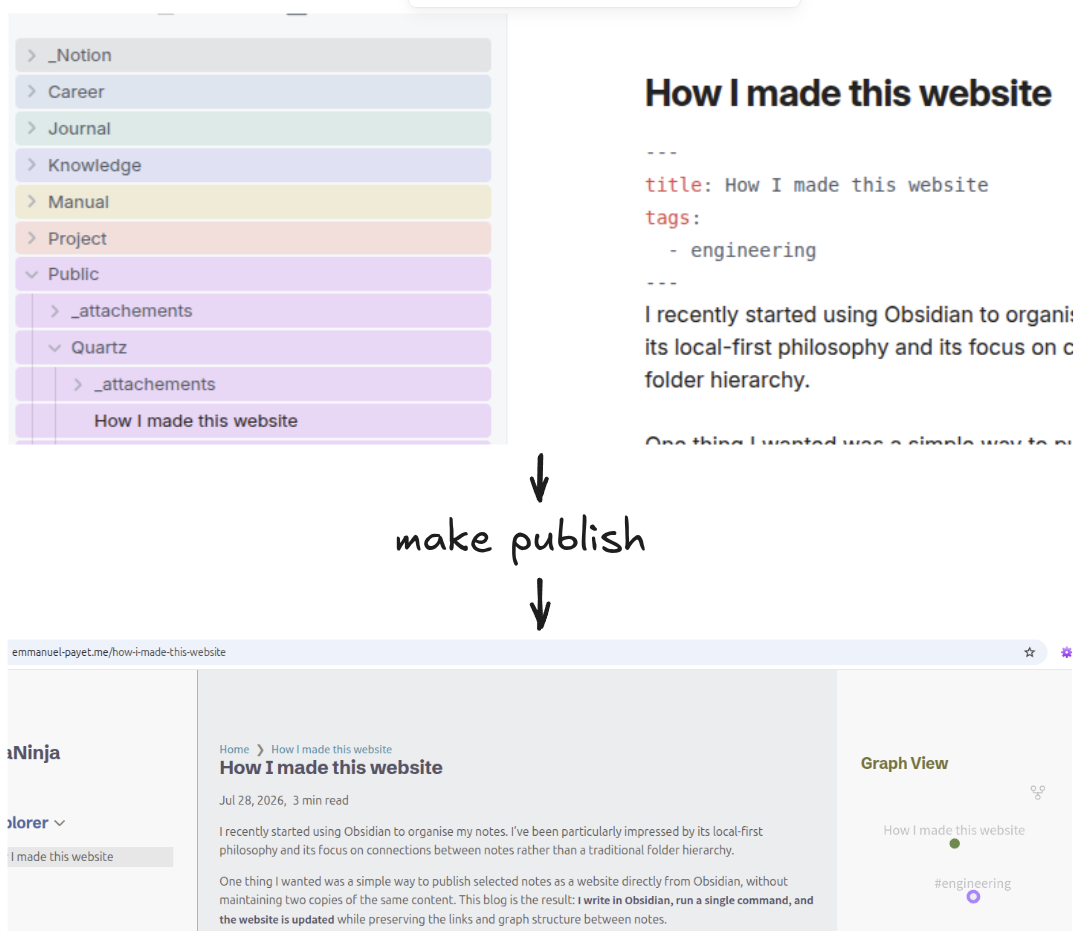
The source for this website, including all of its content, is available on GitHub: https://github.com/epayet/epayet.github.io
How it works
Tools used
- Obsidian: Writing and organising notes
- Quartz: Static site generator that turns Markdown files into web pages while preserving links and the note graph
- GitHub Pages: Free hosting of the website and deployment
Quartz was a natural fit because it already understands Obsidian-style Markdown and preserves links between notes. I followed the steps on the quartz documentation to get a blog running: https://quartz.jzhao.xyz/#-get-started.
Separating where the content and website live
At first I kept the Quartz repository inside my Obsidian vault. It worked, but it quickly became annoying: Obsidian indexed everything in the repository, including node_modules, Quartz documentation, and other project files. My vault was no longer just my notes.
Ideally I wanted:
- my notes to live in a clean Obsidian vault (I put them in a folder called
Public/Quartz) - the website code to live in its own repository
- a single command to get the notes from Obsidian and publish
Making it work
Both quartz build and quartz sync have the option to use a separate content directory with --directory=....
quartz build works perfectly with this setup, but quartz sync expects the content to live inside the Git repository. It does a bit of Git shenanigans behind the scenes that don’t work when the content lives elsewhere.
After considering mounts and Git submodules, I decided not to over-engineer it. For now, publishing simply copies my notes into Quartz’s content directory before running quartz sync. It’s simple, reliable, and good enough for my workflow.
Note: you’ll see on github I do some extra absolute path fixes at the same time to keep the links working.
I ended up writing this Makefile. Here are the most relevant sections:
# Define the source directory where your Obsidian notes live
CONTENT_SRC := /Obsidian/Public/Quartz/

# The local content directory inside the Git repository
CONTENT_DEST := content

[...]

copy:
	@echo "Clearing old content directory..."
	rm -rf $(CONTENT_DEST)
	mkdir -p $(CONTENT_DEST)
	@echo "Copying fresh notes from Obsidian..."
	cp -r $(CONTENT_SRC)* $(CONTENT_DEST)

publish:
	make copy
	npx quartz sync

serve:
	npx quartz build --directory=$(CONTENT_SRC) --serve
Development workflow
Locally: make serve. It has hot reload and everything, which is nice.
Publishing: I write my notes in Obsidian and run make publish. The Makefile copies the public notes into Quartz’s content directory before running quartz sync, which commits, pushes, and triggers deployment through GitHub Pages (using GitHub Actions).
Inspiration
Steph Ango, the CEO of Obsidian, uses a similar setup for his personal website: https://stephango.com/about
See the Quartz showcase with more examples: https://quartz.jzhao.xyz/showcase
What could be improved
There are still plenty of Quartz features I haven’t enabled yet—search, analytics, comments, and more—but those can wait.
The important part is that I now have a publishing workflow I’m happy with, and this is the first post created with it.
I have now made my second post as I’ve decided to split and write more about Quartz itself: